
An activity is a general name for a group of features in an LMS course. Usually, an activity is something that a user will do that interacts with other users and or the instructor.
In LMS terminology, an Activity, such as Forums or Quizzes, properly means something users can contribute to directly and is often contrasted to a Resource such as a File or Page, which is presented by the instructor to them. However, the term activity is sometimes for convenience also used to refer to both Activities and Resources as a group.
There are different types of activities in the standard LMS that can be found when the editing is turned on and the link ‘Add an activity or resource’ is clicked.
- Video
- Video Activity allows you to add video content to a course.
- Assignments
- Enable instructors to grade and give comments on uploaded files and assignments created on and off line.
- Certificate
- The Certificate module creates PDF certificates/diplomas for students in a course.
- Feedback
- For creating and conducting surveys to collect feedback.
- Forum
- Allows participants to have asynchronous discussions.
- ILT Activity
- ILT stand for Instructor-led training. Using this activity user can create a session where the teacher can have a classroom(offline) meeting with enrolled students in course.
- Quiz
- Allows the instructor to design and set quiz tests, which may be automatically marked and feedback and/or to correct answers shown.
- Page
- Allows instructors to create and display web pages using the text editor. It can include text, images, links, and embedded media to present learning content directly within the course.
- SCORM
- Enables SCORM packages to be included as course content.
- PDF Uploader
- The PDF Uploader makes it easy to upload PDF files which cannot be downloaded, printed or copied by the users.
- Custom certificate
- The custom certificate module allows the generation of dynamic PDF certificates with complete customization via the web browser.
- File
- It provides an easy way for an instructor to present materials to their users such as word-processed documents or slideshow presentations.
- URL
- Instructors can use the URL resource to provide their users with web links.
- Zoom Meeting
- Instructor can add an activity of zoom meeting in any course.
- Miscrosoft Teams Meeting
- Instructor can add an activity of microsoft teams meeting in any course.
- Millionaire
- The Millionaire activity is an interactive quiz-based game inspired by “Who Wants to Be a Millionaire?”. It engages learners by allowing them to answer progressively challenging questions for points or rewards.
- Snakes and Ladder
- The Snakes and Ladders activity transforms quizzes into an interactive board game. Learners advance on the board by correctly answering questions, making learning fun and competitive.
- Ai Quiz Generator
- The AI Quiz Generator allows instructors to automatically generate quiz questions using AI while creating a course. This activity is available in the Add Activity popup and, when selected, creates a quiz activity under Topic 1 and redirects the user to the AI Quiz Generator form (if the API key is configured).
- AI Activity Builder
- Enables instructors to create interactive learning activities using AI. It helps generate quizzes, content, and exercises automatically, reducing manual effort and enhancing learner engagement.
- Google Meet for PLMS
- Allows instructors to schedule and conduct live online sessions directly within the course. Learners can join virtual classes, participate in discussions, and collaborate in real time using Google Meet integration.
How to add an activity
On any Course Overview page:
-
Enable the “Edit” button.
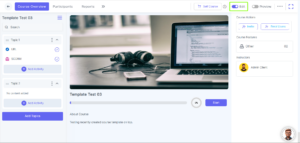
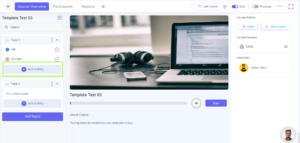
On the Left Navigation of the course format:
-
Click the “Add Activity” (Plus) button next to the desired topic.
-
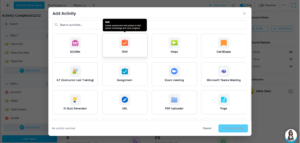
The Add Activity popup will appear.
-
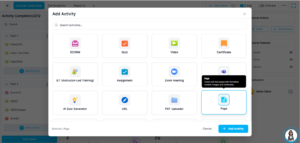
You can search and select any specific activity you want to add to your course from the available list, and then click the “Add Activity” button.
-
Configure the desired activity details, then click the “Save And Display” button to add it to your course.
Can’t find your answer?
Our support team is here to help you with any questions you may have.
Contact Support Team