
Contents
1. Overview
2. Who Can Access
3. Key Features
4. User Flow
5. Important Logic & Conditions
6. Validation Points
7. Notes
Overview
The Quiz Performance Block is available on the Manager Dashboard and helps managers monitor quiz performance of team members.
Who Can Access
- System Manager
- User Profile Manager
Key Features
1. Quiz Selection Dropdown
- Displays courses where team members are enrolled
- Shows quiz activities under each course
- Course names are non-selectable
- Only quiz activities are selectable
2. Performance Metrics
- Pass Rate = (Passed / Attempted) × 100
- Attempted = Learners who attempted
- Not Attempted = Learners who did not attempt
3. Team Performance Table
| Column | Description |
|---|---|
| Team Member | Username with profile picture or initials |
| Score | Grade out of maximum |
| Attempts | Total attempts |
| Last Attempt | Latest attempt date/time |
| Status | Passed / Failed / Not Attempted |
User Flow
- Login as Manager
- Go to Manager Dashboard
- Open Quiz Performance Block
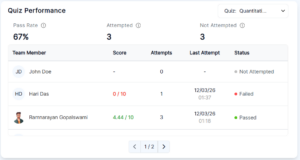
- Select quiz
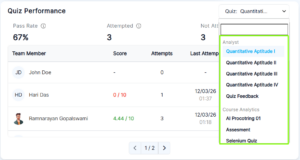
- View stats and table
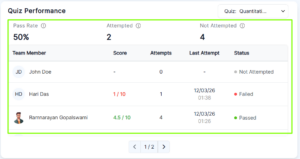
Important Logic & Conditions
Score
- Based on quiz settings
- Multiple attempts follow grading method
- If not attempted → “–”
Attempts
- Total attempts shown
- If not attempted → 0
Status
- Passed
- Failed
- Not Attempted
Validation Points
- Block visible on dashboard
- Correct dropdown data
- Accurate metrics
- Correct table data
Notes
- Shows only manager’s team data
- Updates dynamically