
Skip to content
logo Home
Home page
  • #4125 (no title)
  • #7353 (no title)
  • #7405 (no title)
  • #7413 (no title)
  • #7758 (no title)
  • Home Page v1
  • Privacy Policy
  • Sample Page
Home / No login

No login

Authentication
  • Managing authentication
  • Manual accounts
  • No login
  • Email-based self-registration
  • CAS server (SSO)
  • External database
  • LDAP
  • No authentication
  • Authentication FAQ

An administrator may “turn off” or suspend a user’s account by selecting “No Login” in the “Choose an authentication method setting” in the user’s profile > edit profile, or by ticking the ‘Suspended account’ checkbox.
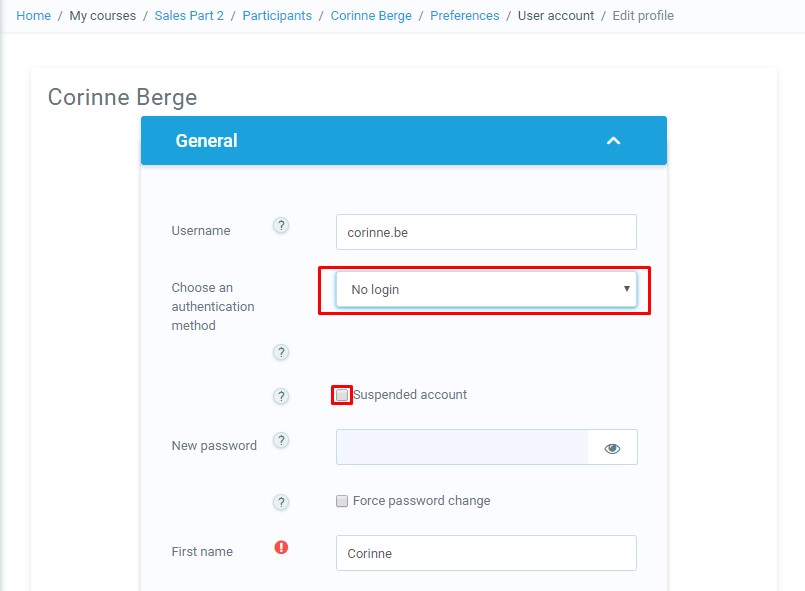
Different users have to have unique email addresses in their profile, even when email is not enabled. When the “No Login” setting is used, the account email may not be re-used to create another account. This essentially is a way to bar a particular user account from using LMS for the duration that the account is assigned to this authentication type.

Post navigation

GDPR FAQ
➤

Contact Support

Please submit any bugs, ideas, new feature requests, questions, issues with documentation or server. We will get back to you within 1 business day. If it’s urgent ticket, please mention your phone number in the description.

Please enter first name

Please enter last name

Please enter valid email address

Please select priority

Please enter message

Cancel Send

Your message successfully send. we will contact you soon.